Blog Posts
Webmention support
I've known about webmentions for years, as well as microformats; I've even included microformats in my markup for probably close to a decade at this point. But accepting and sending webmentions, while it seemed like a great idea, just never really made it to my priority list.
Until it did.
HTML Hyphenation Hints
I recently was troubleshooting how to force the browser to hyphenate a PHP class name, and discovered something new.
The HTML entity ­ is a "soft hyphen"; it won't display unless the browser decides to introduce a line wrap at that point.
It's shy like that.
Nextcloud SSRF rules and internal address ranges
I use Nextcloud, and have used the Nextcloud News app as my feed reader for a number of years.
Since moving all my hosting to a home lab, I noticed that Nextcloud News was unable to retrieve feeds from my own website, which was weird. Looking at the logs, I saw notes about "host violates local access rules".
Musings on GenAI
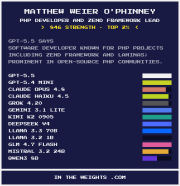
Evidently, the AI models trained on my internet activity, and I have thoughts.
Determining if a reboot is required on Linux
I've been using the construct sudo run-parts /etc/update-motd.d/ to determine if recent system updates required a reboot.
Today I learned I can simply check for the existence of the file /var/run/reboot-required.
PHP DateTimeImmutable::createFromFormat Reset Character
I was recently building something that was taking date input from an HTML form field, and casting it to a PHP DateTimeImmutable. I was then comparing that to another date, and got thrown off during testing when I compared the resulting instance to new DateTimeImmutable('today'); the instances were not considered equal.
SQL ENUM Modification
I'm doing a little DB work recently, and needing to choose how to represent certain data in the database. For a few fields, ENUM would be the correct choice, but there's a possibility I would need to expand the ENUM later to add values.
My question: is this safe?
CSS Grid Lanes
I've been using the experimental "display: masonry" CSS for my gallery and a few other areas of my website for over a year (with a fallback to standard grid columns). However, I noticed in the last few months that my browser was no longer honoring it, and finally researched what happened.
It turns out it's been renamed to "display: grid-lanes" in the CSS Grid Level 3 specification. Otherwise, everything else remains the same; continue using grid-template-columns and grid-template-rows as you did with the the masonry display.
Safari has it in preview already, while Firefox and Chrome-based browsers have it behind a flag. (On Chrome-based browsers, visit chrome://flags, and enable the "css-grid-lanes-layout" flag.)
Headless boot for Beelink EQ14
A few months back, I purchased a Beelink EQ14 mini server for my homelab. One thing that has frustrated me has been that rebooting or even powering on... has required I have either my keyboard or my monitor plugged in (I haven't been able to determine exactly which one yet). This has made me reluctant to reboot, as I then have to switch my keyboard from my workstation over to the server, and plug the HDMI from one of my monitors into it. I hate it.
In browsing a number of forums, I saw one recommendation to switch the BIOS to use FastBoot.
~~Can confirm, works!~~
Update
While FastBoot helps, it doesn't entirely fix the issues. What I discovered was that the server was requiring my keyboard in order to boot; I tested this by rebooting the machine without cables, and plugging in only the keyboard.
Unfortunately, there are no BIOS settings to override this behavior. I dug up an old USB dongle for a presentation pointer, plugged that in, and voilá — it boots now. I suspect any USB HID dongle will likely work.
Globbing files to pass to CLI command options
I've been using Helm recently as part of a new product offering, and as a way to deploy my various websites. Helm allows providing values to the templates in a Helm chart via one or more values files, which are provided via the option -f. It's often useful to break these into several files, so you can do things like cover common values, and then environment- or namespace-specific values.
However, the -f option only accepts a single value, and doesn't recognize globs.